
JSON Outline View
The Outline view for JSON documents displays the list of all the components of the JSON document you are editing. By default, it is displayed on the left side of the editor. If the view is not displayed, it can be opened by selecting it from the menu.
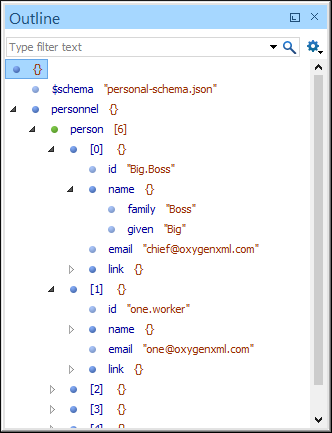
Outline View Features
- You can quickly navigate through the document by selecting nodes in the Outline tree.
- You can move elements by dragging them to a new position in the tree structure.
- It is synchronized with the editor area, so when you make a selection in the editor area, the corresponding nodes are highlighted in the Outline view, and vice versa.
- Document errors are highlighted in the Outline view. A tooltip also provides more information about the nature of the error when you hover over the faulted element.
- Arrays and array elements have the number of their children elements displayed in their label and each child is prefixed with the index in the array.
Outline View Interface
By default, it is displayed on the left side of the editor. If the view is not displayed, it can be opened by selecting it from the menu.
The upper part of the Outline view contains a
filter box that allows you to focus on the relevant components. Type a text fragment in the
filter box and only the components that match it are presented. For advanced usage you can use
wildcard characters (such as * or ?) and separate multiple
patterns with commas.
It also includes a  Settings menu in the top-right corner that presents the following options to help
you filter the view even further.
Settings menu in the top-right corner that presents the following options to help
you filter the view even further.
- Filter returns exact matches
- The text filter of the Outline view returns only exact matches.
 Selection update on cursor move
- Controls the synchronization between Outline view and source document. The selection in the Outline view can be synchronized with the cursor moves or the changes in the editor. Selecting one of the components from the Outline view also selects the corresponding item in the source document.
 Flat presentation
mode of the filtered results
Flat presentation
mode of the filtered results- When active, the application flattens the filtered result elements to a single level.
Drag and Drop Actions in the Outline View
Entire JSON properties, objects, and arrays can be moved or copied in the edited document using only the mouse in the Outline view with drag-and-drop operations. Several drag and drop actions are possible:
- If you drag a JSON node within the Outline view and drop it on another node, then the dragged node will be moved after the drop target.
- If you hold the mouse pointer over the drop target for a short time before the drop then the drop target node will be expanded first and the dragged node will be moved inside the drop target.
- You can also drop a node before or after another node if you hold the mouse pointer towards the upper or lower part of the target. A marker will indicate whether the drop will be performed before or after the target node.
- If you hold down the Ctrl (Command on macOS) key after dragging, a copy operation will be performed instead of a move.
Contextual Menu Actions
The following actions are available in the contextual menu of the JSON Outline view:
 Cut
Cut- Cuts the currently selected component.
 Copy
Copy- Copies the currently selected component.
 Paste
Paste- Pastes the copied component.
 Delete
- Deletes the currently selected component.
 Expand More
- Expands the structure of a component in the Outline view.
 Collapse
All
Collapse
All- Collapses the structure of all the component in the Outline view.